This post was published on 2 December 2021, during the transition of .tr domain names to TRABIS; the dates, rules and steps in it may be out of date. For current information, see the .TR Domain Name page and the Knowledge Base.
Contents
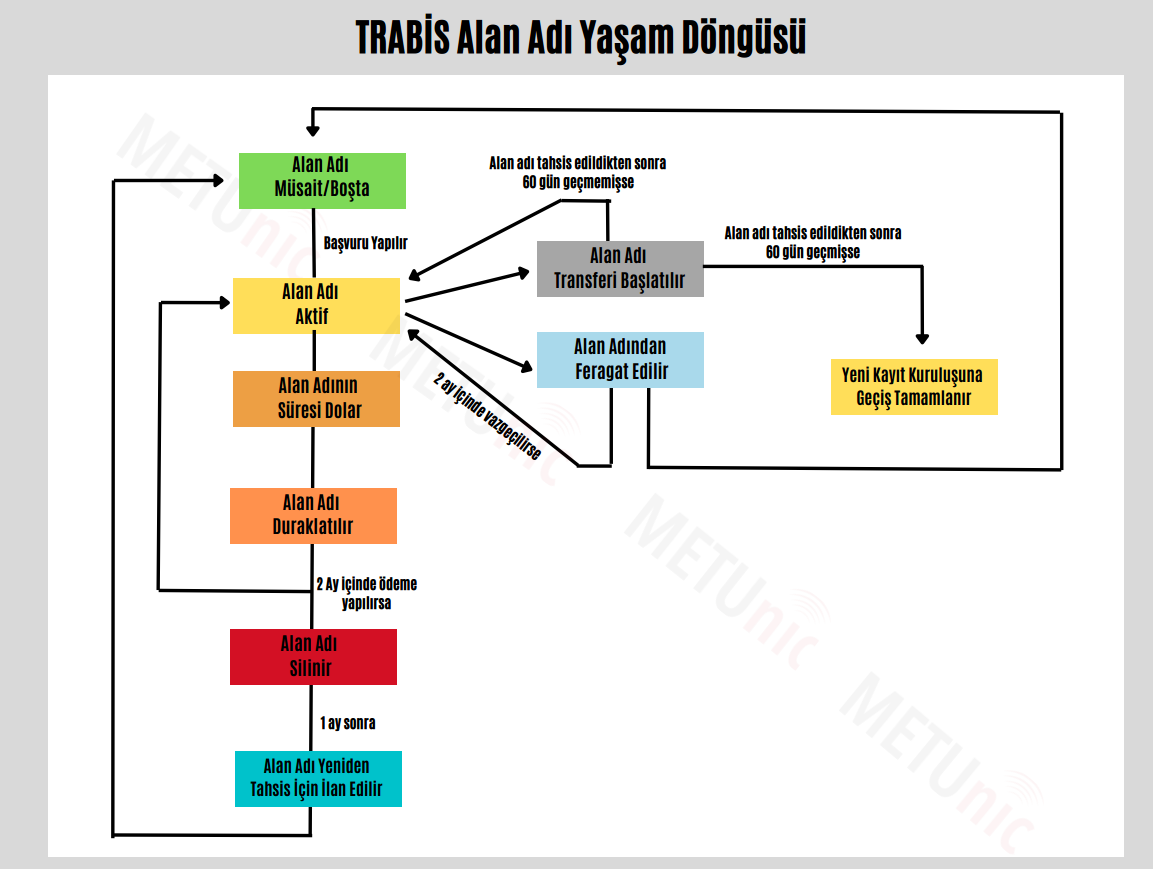
In the TRABIS era, a .tr domain name goes through a set of stages from application to deletion. The diagram below summarises these stages and the transitions between them; below the diagram we explain each stage in turn.
From Application to an Active Domain Name
The cycle starts when the domain name is Available/Free. An application is made for a domain name in this state, and once the application is complete the domain name is allocated and becomes Active. As long as your domain name is active, you can use it, manage its add-on services and renew it before it expires.
Expiry, Suspension and Deletion
If the domain name is not renewed in time, the Domain Name Expires and it is Suspended. Domain names that are not paid for are suspended for two (2) months after the payment due date. All network services associated with a suspended domain name become unreachable; for example, you cannot send or receive email with the addresses on that domain name.
- If payment is made within 2 months: the domain name returns to Active. A late renewal fee applies to renewals made after the expiry date.
- If no payment is made within 2 months: the domain name is automatically Deleted by the TRABIS system.
After deletion, the domain name cannot be allocated again for one (1) month. At the end of this period the Domain Name Is Announced for Re-allocation and returns to the start of the cycle, the Available/Free state. Domain names opened for re-allocation are published on the TRABIS website. If you want to get a domain name at this stage, you can create a Backorder application.
The Transfer Process
For an active domain name, a transfer request to another registrar can be created with the Domain Name Transfer Is Started step. As the diagram shows, the outcome depends on the domain name's allocation date:
- If 60 days have not passed since the domain name was allocated, the transfer does not take place and the domain name stays active with its current registrar.
- If 60 days have passed since the domain name was allocated, the Move to the New Registrar Is Completed.
To start a transfer, at least 60 days must also have passed since the domain name was transferred to its current registrar.
Waiving a Domain Name
A waiver is the process by which the domain name holder ends the use of the domain name and has it deleted before its allocation period ends. After the Domain Name Is Waived step in the diagram, the domain name is deleted and its use is suspended for two months. At the end of that period the domain name is opened for re-allocation and the cycle starts again from Available/Free. At METUnic, a waiver request is started by opening a support ticket.
Conclusion
The easiest way not to lose your domain name is to renew it before it expires. If a domain name has already been suspended, you can make it active again by paying within the two-month period.
Nazlıcan Yamankurt – METUnic – December 2021
Was this article helpful?
Thank you for your feedback.
Still stuck? Our support team is here to help. Tell us your question and our experts will help you.