Contents
Domain names go through different life periods before and after registration. These periods are determined by ICANN, which can be described as the highest authority on domain names worldwide.
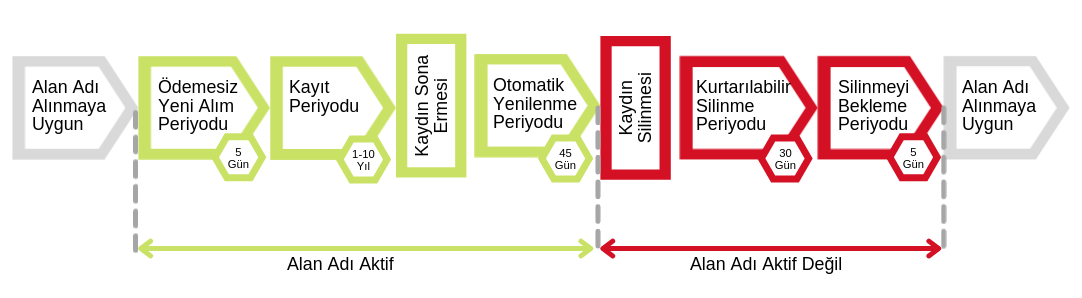
Add Grace Period
This is the 5-day period after the domain name is registered. The domain name and email become active. During this period, the domain name can be deleted by contacting the registrar. Domain names deleted during this period become available for registration again.
Registration Period
This is the period of 1 to 10 years during which the domain name is registered. During this period, domain names and emails are active. Domain names can be renewed and transferred.
Auto-Renew Grace Period
This is the 45-day period after the domain name is automatically renewed. During this period, domain names can be renewed, transferred or deleted without a penalty, or the renewal fee that was automatically paid for the domain name can be refunded. During this period, domain names and emails are active.
Redemption Grace Period
This is the 30-day period after the auto-renew period. Even if the domain name is deleted by the registrar, it remains in the registry's database. This way, the domain name can be recovered by paying the domain name renewal fee and a redemption fee. During this period, domain names and emails are not active.
Pending Delete Period
This is the 5-day period after the end of the redemption grace period. If the domain name has still not been recovered, it moves to the pending delete stage. A domain name pending deletion cannot be recovered or renewed. At the end of this period, the domain name is deleted and becomes available for registration again.
What Is a Domain Name Transfer?
A domain name transfer is the process of moving your domain name from the company where it currently resides to another company. If the transfer conditions specified by both companies are met, you can easily complete the process.
For your domain name to be transferred from a different operator, it must meet certain conditions and have a transfer code (authcode). Transfer codes are valid for all extensions except .tr extensions; however, their use and transfer procedures differ depending on the extension.

What Is Automatic Renewal of a Domain Name?
As stated in the renewal policy set by ICANN, the registry authority, if a domain name registration is not renewed by its expiration date, automatic renewal takes place. In this case, the registration is automatically renewed by the system on the first day after the expiration date. In other words, when a domain name registration reaches its expiration date, the domain name is automatically renewed for one year by ICANN, the registry authority. This renewal fee is equal to the fee for a 1-year domain name registration period and is collected from the registrar by ICANN. In this way, the domain name moves into the auto-renew period. Up to 45 days are allowed for the renewal fee to be paid. If it is not paid within this period, the domain name registration is deleted and moves to the redemption stage.
What Is the Transfer Procedure Set by ICANN During the Auto-Renew Period?
After a domain name transfer, the 1-year registration fee collected from the losing registrar for the automatic renewal is refunded to the losing registrar by ICANN. The 1-year registration period added by the automatic renewal of the domain name is thus deleted.
The logic behind this "refund rule" for domain names transferred during the auto-renew period is that the losing registrar will no longer sponsor the domain name in the registry for the rest of the year and should not bear the registration costs.
The gaining registrar is charged for a one-year period for the transfer of the domain name's sponsorship. The design of the system allows registrants to move their domain names to a new registrar within 45 days after the registration expiration date without paying any registration fee to the losing registrar.
Domain name holders who transfer during the Auto-Renew Period should consult the losing registrar about a possible refund. Even if losing registrars receive a refund from ICANN for the automatic renewal fees they paid for the domain name, they may not refund their customers. If the losing registrar fails to refund the customer, domain name holders end up paying registration fees both to the losing registrar (for the automatic
renewal) and to the gaining registrar (for the transfer), and receive only a one-year extension.
In short, in most cases where a domain name is transferred during the 45-day auto-renew period that begins after its expiration date, registrars should explain to their customers and advise them that the successfully transferred registration will be extended by only one year, not two as might be expected.
In such cases, when you want to transfer the domain name during the auto-renew period, the following happens simultaneously:
- the automatically renewed one-year registration is removed and the automatic renewal fee is refunded to the losing registrar,
- for the year added to the registration period because of the transfer, the registration fee for one renewed year is paid to the gaining registrar.
Melis Ergen – METUnic – September 2021
Was this article helpful?
Thank you for your feedback.
Still stuck? Our support team is here to help. Tell us your question and our experts will help you.