You log in to the METUnic control panel with your Single Sign-On (SSO) account. When you create a new account, you first need to verify your email address to activate it. This guide walks you through the verification steps.
Verifying Your Email Address
1. After you create your account, the email verification page opens and an email with verification instructions is sent to your email address.

If you did not receive the email, you can resend it using the link at the bottom of this page.
Clicking the Verification Link
2. Click the “Verify Email Address” button in the email. If the button does not work, you can copy the link in the email and paste it into your browser.
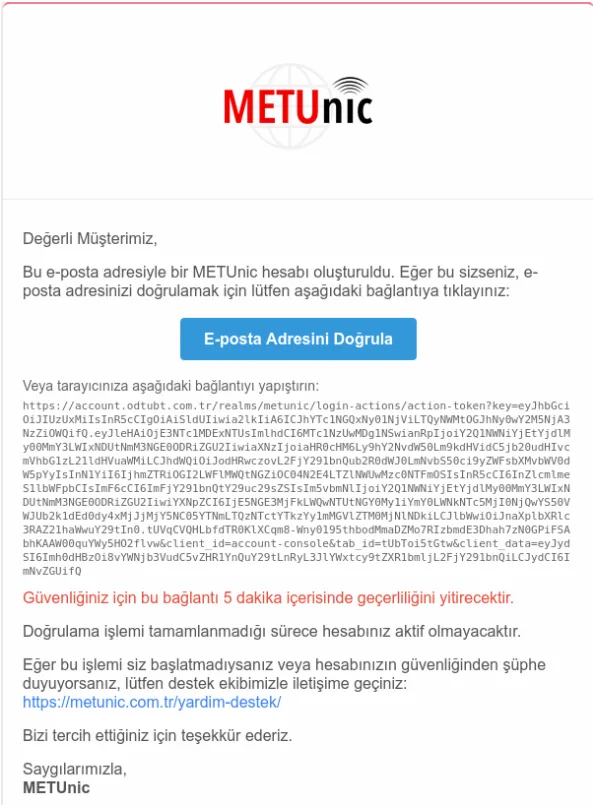
IMPORTANT: For your security, the verification link expires within 5 minutes. Your account will not be active until verification is complete.
Logging In After Verification
3. Once verification is complete, your account is activated. You can now log in at https://app.metunic.com.tr/client/login/ with your email address and password.
We explain how to use the verification code sent to your email address at login in Keylock: How to Use the Verification Code When Logging In.
Reminder: If you cannot find the verification email in your inbox, please also check your spam folder.
Was this article helpful?
Thank you for your feedback.
Still stuck? Our support team is here to help. Tell us your question and our experts will help you.