If you have forgotten your password while logging in to your email account, you can set a new one in a short time by following the steps below.
Accessing Your Email Service
Logging in to the Panel
- First, log in to the Customer Panel with your user credentials.
- In the top menu, click "Services" → "Email".
- In the list that opens, find your email service and click the "Info" (i) button.
- This screen shows the general information and management options for your service.
Editing Users
- On the Info screen, click the "Edit Users" option.
- Here you can view existing users, add new users or perform editing operations.

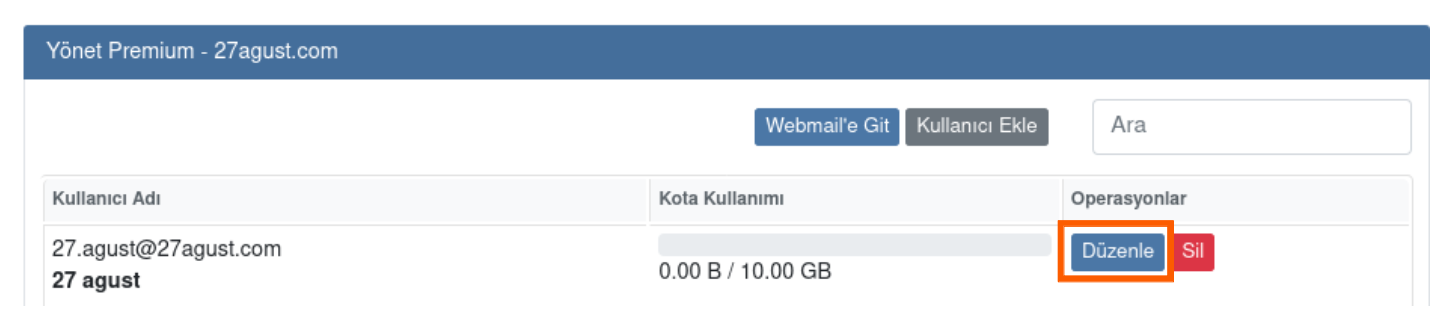
- Find the user whose password you want to reset and press the "Edit" button.
Setting a New Password
User Edit Screen
In the window that opens:
- Check the first name and last name information.
- Check the "Change Password" box.
- Enter your new password.
- If you wish, you can use the "Suggest a Strong Password" link to choose a secure password generated by the system.
- You can determine the user's storage capacity by selecting the quota (space).
- Your new password must contain at least 8 characters, uppercase/lowercase letters, digits and symbols.

- After entering the information, press the "Save" button to complete the process.
- The new password becomes active immediately. The user can now log in via Webmail with the new password.
Webmail Login and Support
Webmail Login
To log in with your new password: Go to Webmail
Support
If you need help with the password reset steps, you can contact our support team by clicking here.
Was this article helpful?
Thank you for your feedback.
Still stuck? Our support team is here to help. Tell us your question and our experts will help you.