Contents
You can delete CSR codes you no longer need. Remember to keep a backup of the CSR code that belongs to your active SSL certificate on your computer.
What Is a CSR Code?
A CSR (Certificate Signing Request) is an encoded block of text sent to the certificate authority when you apply for an SSL certificate. It contains your domain name and organization details together with a public key. When a CSR is generated, a matching private key is generated as well. After validation, the certificate authority issues your certificate based on this request.
The CSR codes you generate in cPanel are stored on the server and appear in the list in the SSL/TLS tool. With new applications and certificate renewals, this list can grow over time.
When Should You Delete a CSR Code?
Keeping the list tidy makes it easier to find the right CSR code for a new application. You may want to delete a CSR code in the following cases:
- The CSR was generated with the wrong domain name or incorrect organization details,
- The old CSR is no longer used after the certificate was renewed,
- You abandoned a certificate application you had started.
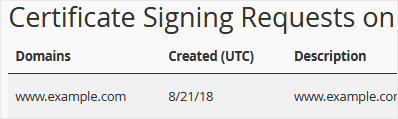
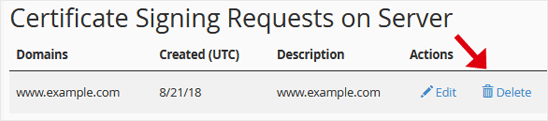
Before deleting, check the Domains, Created (UTC) and Description columns in the list to make sure you have selected the right row. If there is more than one CSR for the same domain name, the creation date helps you tell which one is current.
Steps to Delete a CSR Code in cPanel
- Log in to your cPanel account.
- In the Security section, click SSL/TLS.

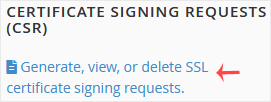
- Under Certificate Signing Requests (CSR), click Generate, view, or delete SSL certificate signing requests.
- Under Certificate Signing Requests on Server, you will see the CSR codes generated earlier.
- Click Delete in the Actions column, then select Delete again to confirm.
The CSR code is deleted and is no longer stored on the server.
After Deleting
Next to the Delete link in the Actions column there is also an Edit link; if you only want to update the description instead of deleting, you can use it. Since deletion cannot be undone, check once more before confirming.
If you need a CSR code for a new SSL certificate in the future, you can generate a new CSR from the link on the same page. To learn about SSL certificate types, take a look at our SSL Certificate page.
Was this article helpful?
Thank you for your feedback.
Still stuck? Our support team is here to help. Tell us your question and our experts will help you.