Contents
You can include your domains and subdomains in the AutoSSL process or leave them out of it.
Checking the AutoSSL Status
If your domain was added recently, wait a few hours for cPanel to install an SSL certificate on it automatically. You can check the latest AutoSSL log under cPanel > SSL/TLS Status > Certificate Status.
How to include a domain in AutoSSL
- Log in to your cPanel account.
- In the Security section, click SSL/TLS Status.

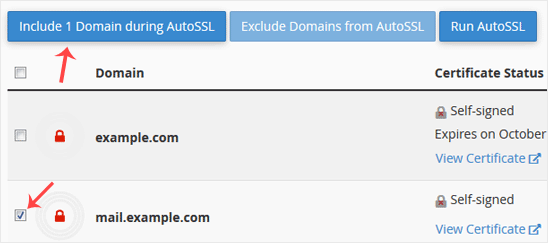
- In the Domain column, tick the domain you want to include and click Include X Domain during AutoSSL. The selected domains and subdomains are included in AutoSSL.
How to exclude a domain from AutoSSL
- In the Domain column, tick the domains you want to exclude and click Exclude X Domain from AutoSSL. The selected domains and subdomains are excluded from AutoSSL.
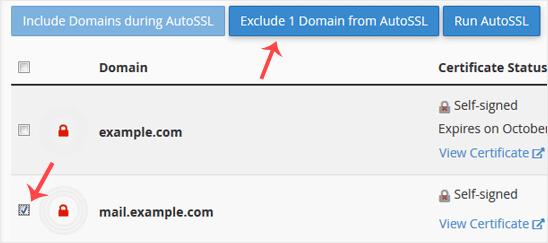
Note: You can only exclude domains that you previously included in AutoSSL.
Was this article helpful?
Thank you for your feedback.
Still stuck? Our support team is here to help. Tell us your question and our experts will help you.