cPanel automatically installs an SSL certificate on your domain within a few hours. All METUnic hosting packages include a free AutoSSL (Let's Encrypt) certificate.
Checking the AutoSSL Log
If your domain still has no SSL after 24 hours, first check the latest AutoSSL log under cPanel > SSL/TLS Status > Certificate Status. If you see an error, try to fix it or open a support ticket.
Running AutoSSL Manually
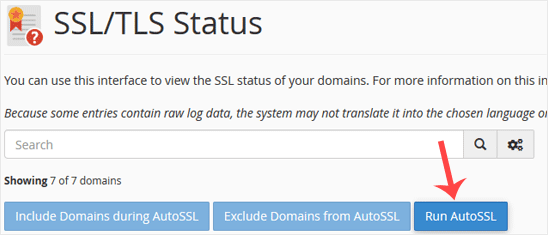
If there is no error, AutoSSL has not processed your domain yet. In that case, you can run AutoSSL for your domain manually:
- Log in to your cPanel account.
- In the Security section, click SSL/TLS Status.

- Click the Run AutoSSL button. When the process finishes, a success or error message is shown.
Interpreting the Result
If a success message appears, the SSL certificate will be installed on your domain automatically within a few hours. If an error message appears, check it and send it to us in a support ticket so we can solve the problem for you.
Note: SSL installation is fully automatic. AutoSSL domain validation can sometimes take up to 24 hours.
Was this article helpful?
Thank you for your feedback.
Still stuck? Our support team is here to help. Tell us your question and our experts will help you.