Contents
If you want to be notified when your disk quota or bandwidth usage limit is about to be reached, or to update your cPanel contact information, follow the steps below.
cPanel notifies you by email about important events on your account: your disk quota being nearly full, your password changing or your contact email address being updated are some examples. For these notifications to reach you, cPanel must have an email address that is up to date and that you check regularly. When you forget your password, the reset confirmation is also sent to this address.
Steps to Update Your Contact Information
- Log in to your cPanel account.
- In the Preferences section, click Contact Information.
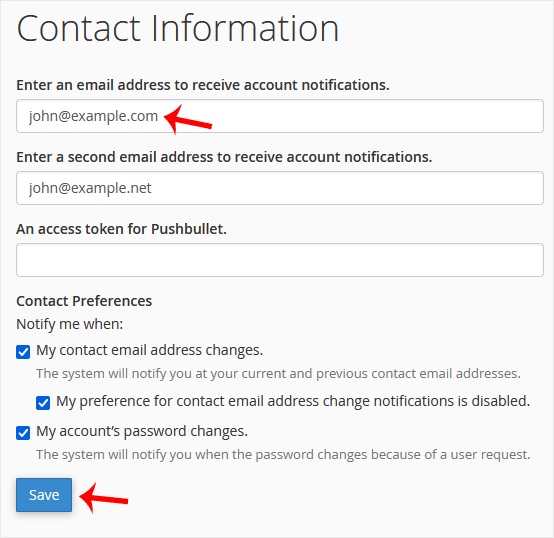
- You will see the email address field for account notifications and password reset confirmations. You can update your current email address or add a second email address in the second box.
- Under Contact Preferences, tick the events you want to be notified about. Warnings sent when your account approaches its disk quota or bandwidth limit are also in this list.
- Click the Save button.
Your contact information and notification preferences have been updated.
Fields on the Contact Information Page
On the Contact Information page you will see the following fields:
- Enter an email address to receive account notifications: The primary email address account notifications are sent to.
- Enter a second email address to receive account notifications: A second email address notifications are also sent to. Filling in this field is optional.
- An access token for Pushbullet: If you also want to receive notifications through the Pushbullet app, you can enter your access token in this field.
Which Notifications Can You Choose?
In the Notify me when list in the Contact Preferences section, you receive a notification for every event you tick. The screenshot shows the following options as examples:
- My contact email address changes: When your contact email address changes, the system notifies you at both your current and your previous contact address.
- My preference for contact email address change notifications is disabled: Warns you when contact address change notifications are turned off.
- My account's password changes: Informs you when your password changes because of a user request.
The options shown in the list may vary depending on the cPanel version and server settings.
Tips
- We recommend using an email address on a different domain name from the one your cPanel account is on as your notification address. That way notifications still reach you if there is a problem with your server.
- Keep the disk quota and bandwidth warnings turned on. When a limit is reached, your website or email accounts may not work as expected; getting the warning early gives you time to clean up unnecessary files.
- For security, do not turn off password change notifications; this way you notice a change made without your knowledge right away.
Was this article helpful?
Thank you for your feedback.
Still stuck? Our support team is here to help. Tell us your question and our experts will help you.